Managing an ArcGIS Online Organization, in my view, is one of the most rewarding roles you can take on, it gives you the control to shape how your organisation uses GIS but that freedom also comes with responsibility – and resilience is at the heart of it!
When administrative access to ArcGIS Online or My Esri is unexpectedly lost, the impact can be immediate and disruptive. We regularly hear from teams caught out by unplanned staff absences or incomplete handovers – issues that can stall projects and create unnecessary stress for users.
If you are an ArcGIS Online administrator, or a passionate user who cares about keeping your organisation resilient and future proof, keep reading – this blog is for you. I’ll be sharing some ArcGIS Online administrator best practice tips to keep your ArcGIS system resilient.
First rule of administrators club…
The first rule is an easy one, promise. It’s to make sure everyone knows you’re the ArcGIS Online administrator. If you aren’t an administrator, take this as your challenge to go and find out who is! When users run into issues, or need access to specific capabilities, they’ll know exactly who to come to – making it much easier for everyone to get back to their work as quickly as possible.
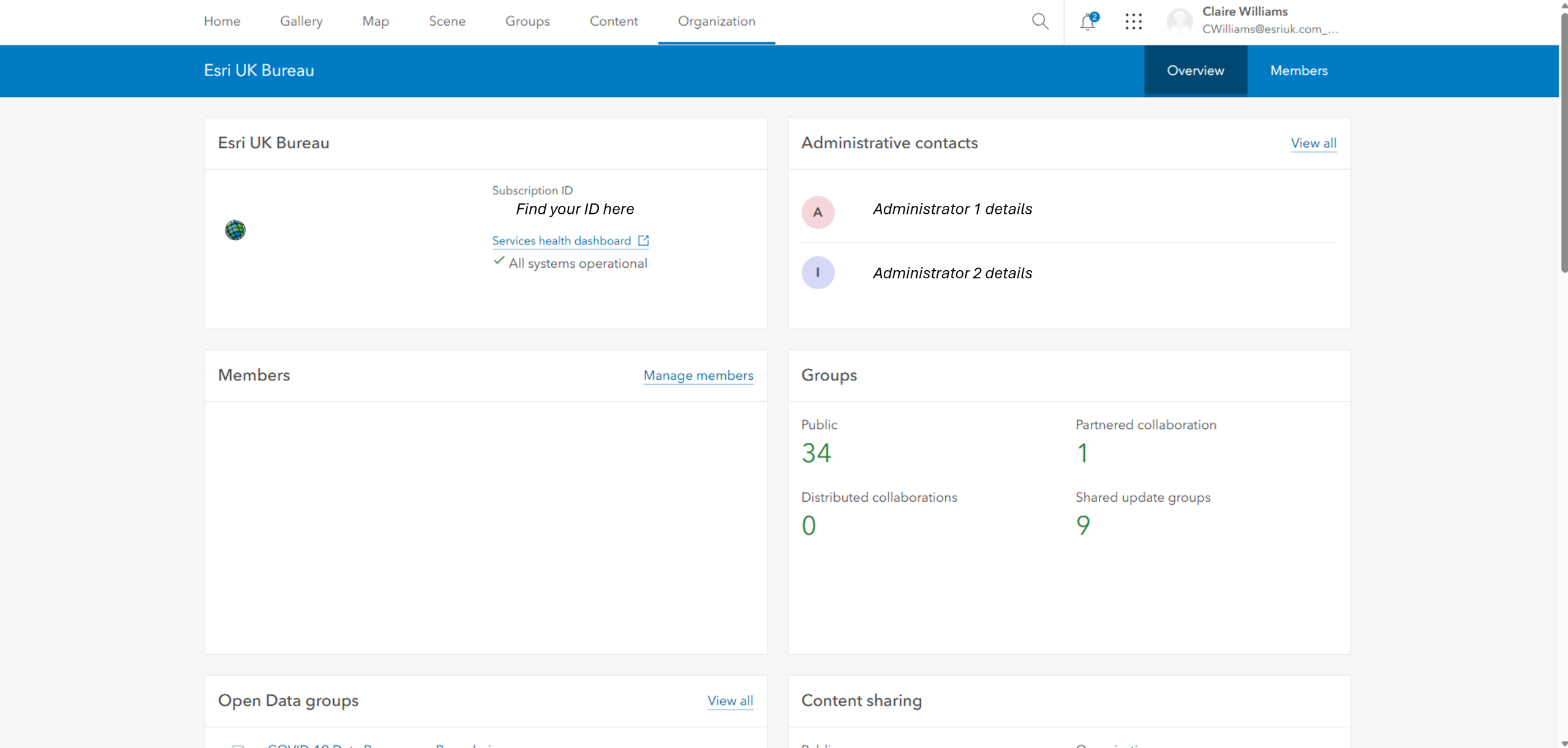
Users can also access your contact details from the Organization page via the Overview tab, and for My Esri users you can find it there also.
Whilst it is important to be known as your ArcGIS Online administrator, it is even more important for resilience that your organisation has more than one.
Why two admins are better than one
Here’s the thing, ArcGIS Online administrators have exclusive access to all the important bits – users, content, licences, security, settings – the whole lot. This means that if the organisation only has a sole administrator and that individual takes unplanned leave, is unavailable or leaves the organisation all together without handing things over, operations can quickly be affected because only one person was holding the keys.
Let’s be honest, your organisation’s users aren’t thinking about their ArcGIS Online admin… that is until something goes wrong. The ArcGIS Online admin is often that one person who knows where everything is, who can reset passwords, assign licences and generally help keep the lights on, and that works… until it doesn’t. The easiest solution is to have at least one backup administrator.
Having more than one administrator isn’t about bureaucracy, it’s rooted in resilience. It ensures there is always someone available who can jump in to make changes, support uses and keep the ArcGIS Online environment running smoothly.
And here’s why its super important: even though ArcGIS Online is a SaaS platform and Esri handle all the heavy lifting behind the scenes, we can’t access your organisation’s admin console. That is by design – your data is yours. This means we can’t swoop in easily and fix things if your only admin disappears, so having multiple admins on side isn’t just a good idea – it’s essential.
My top tips for administrator resilience
Behind all our ArcGIS Online Organizations there is the humble administrator juggling project work and administrator responsibilities. Administrator resilience is about recognising that everyone takes holidays, changes jobs and have unplanned absences. To help mitigate the potential impacts I’ll leave you with my top tips (additional administrator club rules…) for keeping your ArcGIS Online Organization running smoothly:
- Make sure you have a primary and a backup admin
Take five minutes to check who actually has admin rights in your ArcGIS Online or My Esri Organizations. If it turns out, you only have the one… it’s time to find a buddy or encourage your admin to find a buddy!
- Share your Subscription ID and Short URL with a trusted contact
If your organisation does end up with access struggles, a trusted user knowing the ArcGIS Online Organization subscription ID (available in My Esri and the ArcGIS Online Organization page) and short url will ensure that our technical support team can support with administrator reassignment.
- ArcGIS Online subscriptions with only one User Type
If your ArcGIS Online Organization only has one user with a suitable User Type (Creator, Professional or Professional Plus), who would be your administrator by default, and this needs to be changed for any reason, raising a Technical Support case to request the creation of a temporary user will ensure a smooth transition and help to maintain administrative access before the sole user and administrator becomes unavailable. To do this, subscription details as above will be required.
- Use Single Sign-On
SAML or OpenID Connect isn’t just convenience, it centralises password resets, gives you instant access recovery through your domain tools and makes it much easier to reassign admin roles if needed.
- Back to the first rule of administrator club: talk about being the administrator
Don’t be the mysterious, hidden admin, make yourself known in your organisation. Tell people what you do, who the backup is and have a simple plan for handing over your role if you or the backup admin ever moves on.
My administrator already left, what now?!
If you’ve landed here because your sole administrator has already left, please review the following documentation to step through some solutions: Unable to change your ArcGIS Online Organization’s default administrator
Final thoughts
Two (or more!) administrators are better than one. A small, visible, and well‑prepared admin team doesn’t just share the workload – it protects your users, safeguards your access, and gives you genuine peace of mind.
Whether you’re the long‑standing admin, the newly appointed backup (nicely done!) or the GIS champion who’s stumbled across this resource and is now on a mission to discover who their admin is and how many there are, remember this: you’re not on your own.
Our team here at Esri UK is right beside you. We’ve supported organisations through just about every admin scenario you can imagine, and we’re here to help you stay resilient, confident and in control.
Related resources
Esri’s Don’t Let Your Operations be Disrupted highlights practical steps for business continuity, including contingency planning and administrator succession to keep GIS services running smoothly.
Esri’s Change is inevitable: Ensure continuous ArcGIS operations highlights practical approaches to maintaining ArcGIS operations during organisational change.
Esri UK’s ArcGIS Online Administration – Important Considerations highlights practical steps to reduce administrative risk, including succession planning, secondary administrator accounts, and backup access arrangements to help maintain continuous access to ArcGIS Online